---
title: How To Contact Us
description: How to contact us
---
[Skip to content](https://knowledge.intuitiveshipping.com/contact#main-content)
[](https://knowledge.intuitiveshipping.com?hsLang=en)
- [FAQ](https://knowledge.intuitiveshipping.com/faq-page)
- [Main Site](https://intuitiveshipping.com/)
Open main navigation
Close main navigation
- [FAQ](https://knowledge.intuitiveshipping.com/faq-page)
- [Main Site](https://intuitiveshipping.com/)
- [Contact us](https://knowledge.intuitiveshipping.com/contact)
[Contact us](https://knowledge.intuitiveshipping.com/contact)
How can we help?
- There are no suggestions because the search field is empty.
1. [Intuitive Shipping Help Center](https://knowledge.intuitiveshipping.com/?hsLang=en)
2. [Get Help](https://knowledge.intuitiveshipping.com/get-help?hsLang=en)
# How To Contact Us
## We're here to help!
**Contents:**
- [Submit A Ticket](https://knowledge.intuitiveshipping.com/contact#submit-a-ticket)
- [Urgent Support](https://knowledge.intuitiveshipping.com/contact#urgent-support)
- [One-on-One Technical Support](https://knowledge.intuitiveshipping.com/contact#one-on-one-tech-support)
- [Tailored Demo](https://knowledge.intuitiveshipping.com/contact#tailored-demo)
- [Complimentary Onboarding Session](https://knowledge.intuitiveshipping.com/contact#onboarding-info)
- [Status Page](https://knowledge.intuitiveshipping.com/contact#status-page)
**Have a question right now? Submit a new ticket** [here](https://knowledge.intuitiveshipping.com/contact#have-a-question).
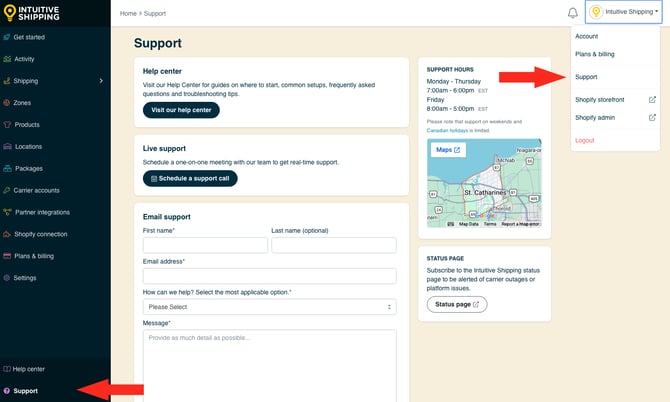
Get the help you need through the app's Support page. Click your **store name** at the top right of any app page, then select **Support** from the drop-down list, or click **Support** at the bottom of the left sidebar menu.
### Submit A Ticket
If you need help while you're using Intuitive Shipping, submit an email support ticket from the app's **Support** page. We typically respond within one business day.
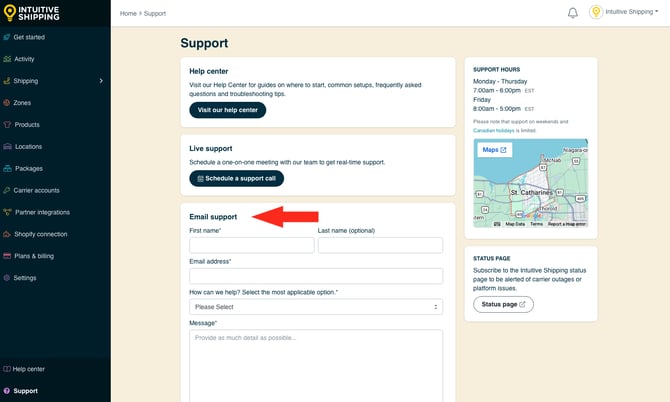
**Regular Support Hours**
- Monday to Thursday: 7:00 am to 6:00 pm
- Friday: 8:00 am to 5:00 pm
\*All times are Eastern Standard/ Eastern Daylight Time (UTC - 05:00/ UTC - 04:00)
We update our support hours periodically, so be sure to check here or the app's Support page for our current support times.
#### Have A Question Now?
If you can't find the answers you need here in the Help Center, let us know how we can help by completing the form below. If your issue is urgent, please [follow the steps in the next section](https://knowledge.intuitiveshipping.com/contact#urgent-support).
### Urgent Support
When submitting a ticket from the app's Support page, select the **URGENT** option if you have **an active billing plan** and you're experiencing a **business-critical** rate calculation issue on a live checkout page.
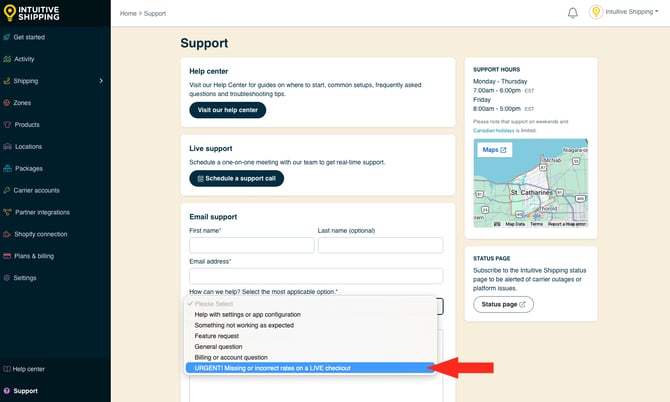
A member of our support team will contact you as soon as possible.
**Please note:** Reponse times for urgent issues submitted outside of regular business hours may be delayed, however, we make every effort to provide urgent support *as quickly as possible*.
### One-on-One Support
Let our support team troubleshoot in real-time. If you have an **active billing plan**, we can diagnose issues and answer setup questions or address concerns about Intuitive Shipping in a live, one-on-one support session.
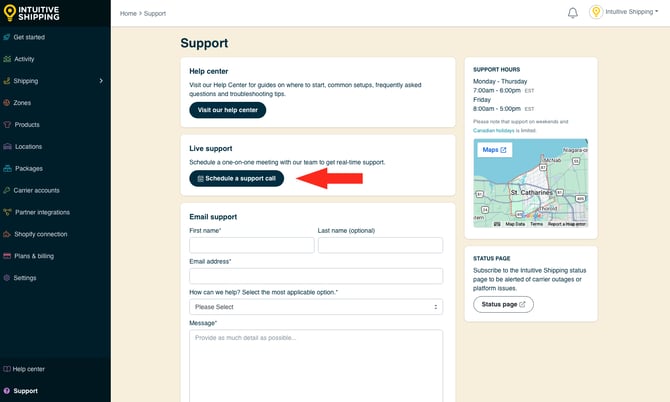

Schedule an appointment directly from the app’s Support page.
Personalized support sessions are scheduled appointments hosted through web conferencing software. To diagnose and address issues more efficiently, we may need to screen share or gain real-time access to your app and store settings.
### Tailored Demo
If you're just starting to explore Intuitive Shipping and want to learn more about what we do, book a tour of the Intuitive Shipping app with one of our fantastic team members! We'll provide tailored guidance to navigate and optimize app features and help you learn how to set your cart apart. Book your free demo session today!

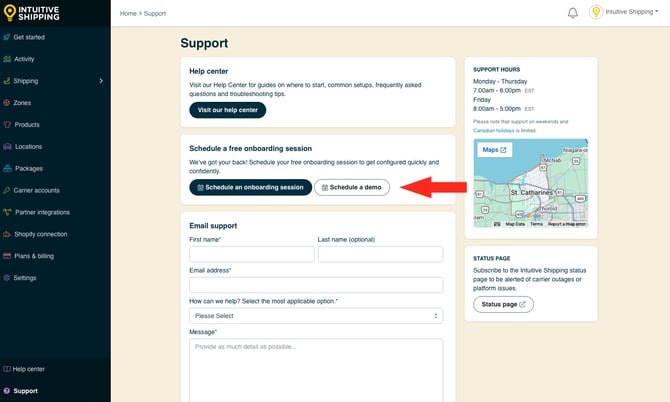
Schedule a demo appointment [here](https://intuitiveshipping.com/meeting/details/demo).
If you have Intuitive Shipping installed and you’re still in **Sandbox** mode, you can schedule a demo directly from the app’s **Support** page.
### Complimentary Guided Onboarding
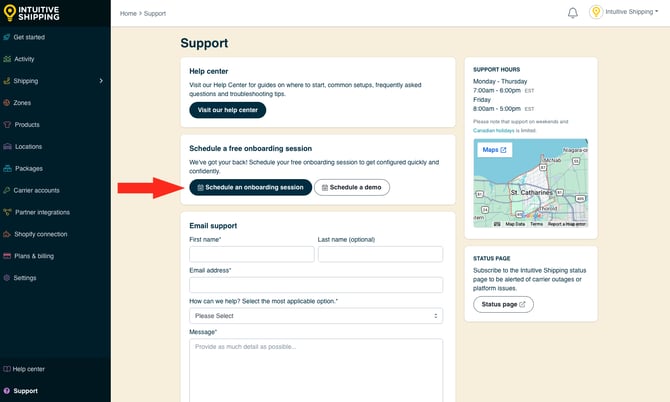
When you're eager to start using Intuitive Shipping but need help getting started, complimentary, guided Onboarding sessions with one of our onboarding specialists will save you time and get you up and running with confidence. We'll configure everything with you at no extra cost. Just book and connect with our team, and see what shipping looks like when it's done right.

Schedule a complimentary guided onboarding session [here](https://intuitiveshipping.com/guided-onboarding/).
If you have Intuitive Shipping installed and you’re still in **Sandbox** mode, you can schedule a complimentary 30-minute or 60-minute session directly from the app’s **Support** page.
Are your shipping requirements complex? That's ok! Our onboarding specialists can guide you through even the most advanced setup.
### Status Page
Check out our **Status page** for real-time app updates. We also provide updates when our carrier partners have rates-related issues.

View and subscribe to our Status page [here](https://status.intuitiveshipping.com/).
Be sure to add the Status page to your **browser bookmarks**. You can also click the **Subscribe To Updates** button at the top of the Status page to receive status alerts via email, text, Slack, or Teams.
- [Get Started](https://knowledge.intuitiveshipping.com/get-started?hsLang=en)
- [Common Setups](https://knowledge.intuitiveshipping.com/common-setups?hsLang=en)
- [Additional Setups](https://knowledge.intuitiveshipping.com/additional-setups?hsLang=en)
- [How-To](https://knowledge.intuitiveshipping.com/how-to?hsLang=en)
- [Connect A Carrier](https://knowledge.intuitiveshipping.com/connect-a-carrier?hsLang=en)
- [Black Friday](https://knowledge.intuitiveshipping.com/black-friday?hsLang=en)
- [Billing & Account](https://knowledge.intuitiveshipping.com/billing-account?hsLang=en)
- [General Info](https://knowledge.intuitiveshipping.com/general-info?hsLang=en)
- [Get Help](https://knowledge.intuitiveshipping.com/get-help?hsLang=en)
- [Main Site](https://intuitiveshipping.com/)
- [FAQ](https://knowledge.intuitiveshipping.com/faq-page)
- [Privacy Policy](https://intuitiveshipping.com/legal/privacy)
- [Terms](https://intuitiveshipping.com/legal/terms)
- [EULA](https://intuitiveshipping.com/legal/eula)
[](http://intuitiveshipping.com)
The shipping solution for serious sellers.
© Copyright 2019-2025 Intuitive Shipping Inc.