---
title: How To Change The Default Shopify Cost Label For Free Shipping
description: How To Change The Default Shopify Cost Label For Free Shipping
---
[Skip to content](https://knowledge.intuitiveshipping.com/how-to-change-the-default-shopify-cost-label-for-free-shipping#main-content)
[](https://knowledge.intuitiveshipping.com?hsLang=en)
- [FAQ](https://knowledge.intuitiveshipping.com/faq-page)
- [Main Site](https://intuitiveshipping.com/)
Open main navigation
Close main navigation
- [FAQ](https://knowledge.intuitiveshipping.com/faq-page)
- [Main Site](https://intuitiveshipping.com/)
- [Contact us](https://knowledge.intuitiveshipping.com/contact)
[Contact us](https://knowledge.intuitiveshipping.com/contact?hsLang=en)
How can we help?
- There are no suggestions because the search field is empty.
1. [Intuitive Shipping Help Center](https://knowledge.intuitiveshipping.com/?hsLang=en)
2. [How-To](https://knowledge.intuitiveshipping.com/how-to?hsLang=en)
# How To Change The Default Shopify Cost Label For Free Shipping
## Update Shopify's default free shipping label from 'free' to something different.
**Contents:**
- [Create A Custom Cost Label For Free Shipping](https://knowledge.intuitiveshipping.com/how-to-change-the-default-shopify-cost-label-for-free-shipping#create-custom-label-for-free-shipping)
- [Update Your Shipping Method](https://knowledge.intuitiveshipping.com/how-to-change-the-default-shopify-cost-label-for-free-shipping#update-your-shipping-method)
When you offer free shipping to customers, Shopify automatically displays a zero-cost shipping rate with the word ‘FREE’ instead of ‘0.00’.
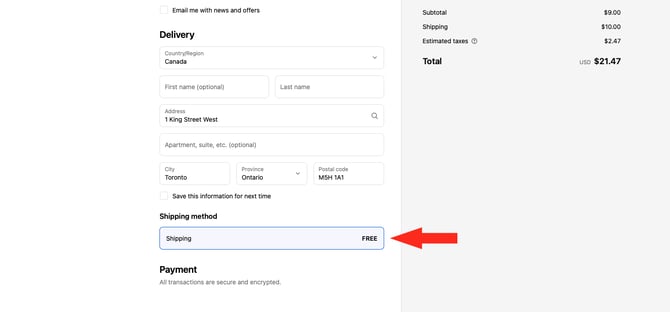
There may be situations when you don’t want the word ‘FREE’ displayed at checkout because your shipping option may not actually be free. For example, you might ship bulky or oversized items that require a custom quote after the order has been placed, and you’ve used a custom description to instruct customers to call for a quote. Or, you might have wholesale customers who can provide their own carrier account credentials in the order notes. In these cases, displaying ‘free’ could be misleading.
You can update the default label in your Shopify settings so that zero-cost shipping rates display as ‘0.00’ or any custom text you prefer.
Changing this label will not change the order in which shipping methods appear at checkout. Shopify *always* lists shipping methods from the lowest to the highest actual cost, and this order cannot be changed. That means, even if you label a zero-cost method as ‘$999’, it will still appear first because the underlying calculated cost remains zero.
### Create A Custom Cost Label For Free Shipping
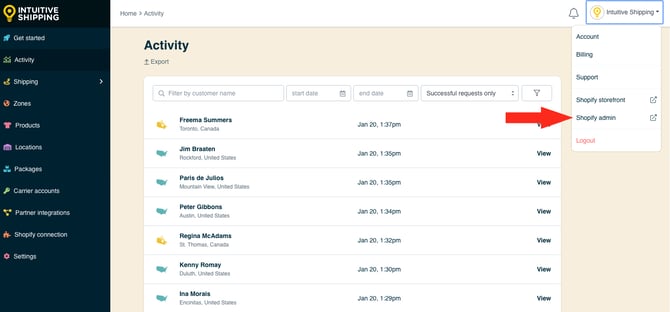
**1.** In Intuitive Shipping, click on your **store name** at the far right of the app header, then select **Shopify admin** from the drop-down list. This will open your Shopify admin screen in a new browser tab.
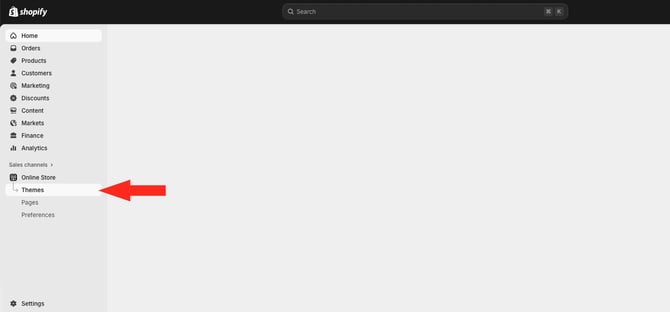
**2.** Click **Online Store** on the Shopify admin sidebar, then select **Themes** from the drop-down list.
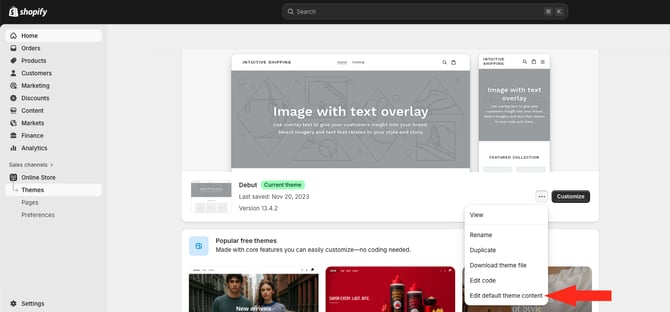
**3.** In the **Themes** section, click the **ellipsis (three dots)** button beside the ‘Customize’ button, then select **Edit default theme content** from the drop-down list.
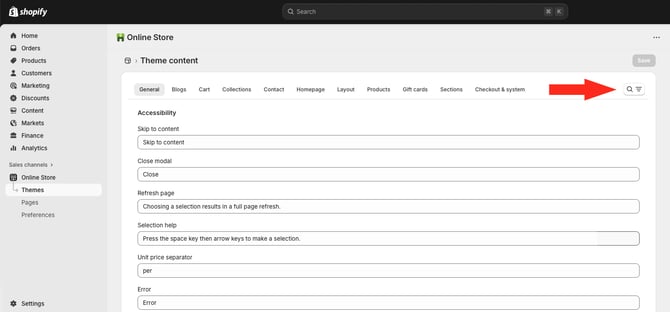
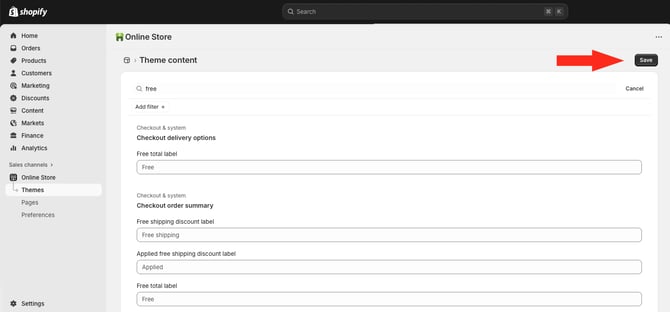
**4.** Click the **search button** at the far right of the 'Theme content' menu.
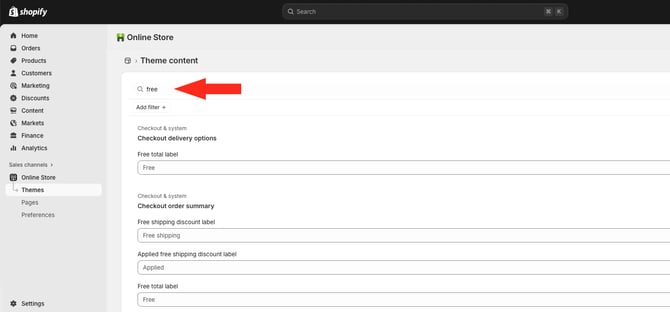
**5.** Enter '**free**' in the search bar to locate the default label field.
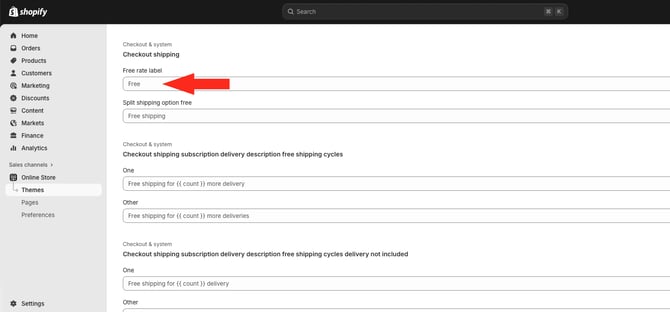
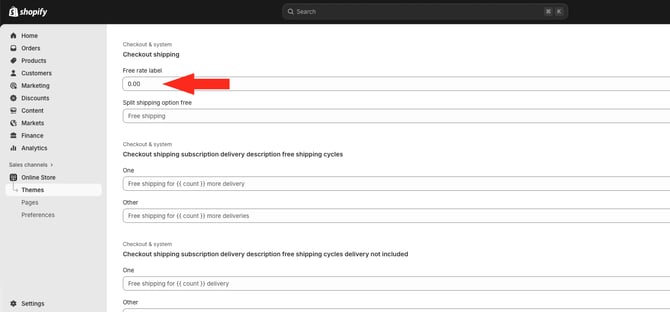
**6.** Look for the ‘**Checkout shipping**’ section. Click on the field below '**Free rate label**', then replace the default label with your **custom label**, such as '0.00'.
Default label:
Custom label:
#### Save Your Settings
**1.** Click the **Save** button at the top right of the page to save your custom label.
### Update Your Shipping Method
You can use Intuitive Shipping’s customization features to add clarity or extra information for your customers so they understand why their shipping cost is showing as zero or something else.
For example, you can create a custom shipping method title like ‘Special Order - Call For Shipping Quote’ and add a custom description such as ‘SHIPPING NOT FREE - Please call to arrange special shipping for these items.’
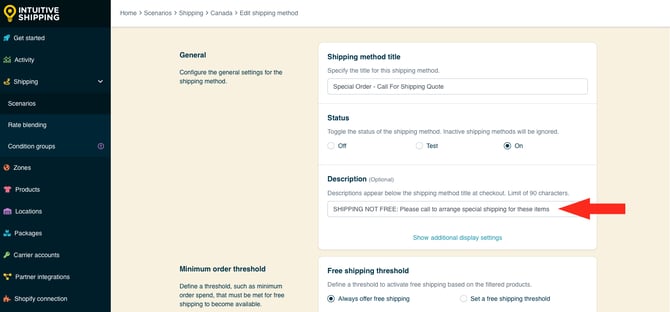

Learn more about how to [create a call-for-quote shipping method](https://knowledge.intuitiveshipping.com/create-a-call-for-quote-shipping-method?hsLang=en).
When a shipping method is free at checkout, your customers will see something like this:
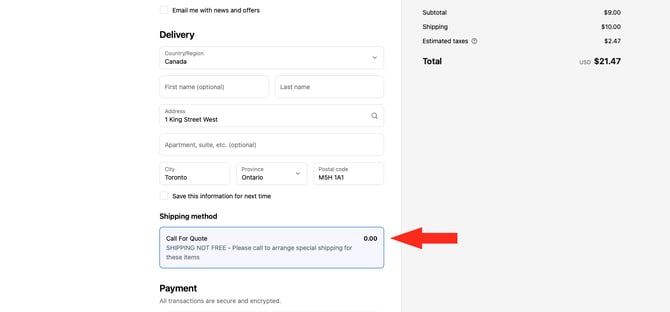
Changing the default Shopify free rate label means that *any* ‘free’ (zero-cost) shipping rate calculated by Intuitive Shipping will be displayed with your custom rate label.
### Learn more:
- [Common setups](https://knowledge.intuitiveshipping.com/common-setups?hsLang=en)
- [Additional setups](https://knowledge.intuitiveshipping.com/additional-setups?hsLang=en)
- [How-to guides](https://knowledge.intuitiveshipping.com/how-to?hsLang=en)
- [Connect a carrier](https://knowledge.intuitiveshipping.com/connect-a-carrier?hsLang=en)
- [General info](https://knowledge.intuitiveshipping.com/general-info?hsLang=en)
- [FAQ](https://knowledge.intuitiveshipping.com/faq-page?hsLang=en)
- [Get Started](https://knowledge.intuitiveshipping.com/get-started?hsLang=en)
- [Common Setups](https://knowledge.intuitiveshipping.com/common-setups?hsLang=en)
- [Additional Setups](https://knowledge.intuitiveshipping.com/additional-setups?hsLang=en)
- [How-To](https://knowledge.intuitiveshipping.com/how-to?hsLang=en)
- [Connect A Carrier](https://knowledge.intuitiveshipping.com/connect-a-carrier?hsLang=en)
- [Black Friday](https://knowledge.intuitiveshipping.com/black-friday?hsLang=en)
- [Billing & Account](https://knowledge.intuitiveshipping.com/billing-account?hsLang=en)
- [General Info](https://knowledge.intuitiveshipping.com/general-info?hsLang=en)
- [Get Help](https://knowledge.intuitiveshipping.com/get-help?hsLang=en)
- [Main Site](https://intuitiveshipping.com/)
- [FAQ](https://knowledge.intuitiveshipping.com/faq-page)
- [Privacy Policy](https://intuitiveshipping.com/legal/privacy)
- [Terms](https://intuitiveshipping.com/legal/terms)
- [EULA](https://intuitiveshipping.com/legal/eula)
[](http://intuitiveshipping.com)
The shipping solution for serious sellers.
© Copyright 2019-2025 Intuitive Shipping Inc.