---
title: Change Your Shopify App Spending Limit
description: How to Change Your Shopify App Spending Limit
---
[Skip to content](https://knowledge.intuitiveshipping.com/change-your-shopify-app-spending-limit#main-content)
[](https://knowledge.intuitiveshipping.com?hsLang=en)
- [FAQ](https://knowledge.intuitiveshipping.com/faq-page)
- [Main Site](https://intuitiveshipping.com/)
Open main navigation
Close main navigation
- [FAQ](https://knowledge.intuitiveshipping.com/faq-page)
- [Main Site](https://intuitiveshipping.com/)
- [Contact us](https://knowledge.intuitiveshipping.com/contact)
[Contact us](https://knowledge.intuitiveshipping.com/contact?hsLang=en)
How can we help?
- There are no suggestions because the search field is empty.
1. [Intuitive Shipping Help Center](https://knowledge.intuitiveshipping.com/?hsLang=en)
2. [Billing & Account](https://knowledge.intuitiveshipping.com/billing-account?hsLang=en)
# Change Your Shopify App Spending Limit
## Increase your Shopify app spending limit to avoid service interruptions due to overage charges.
**Contents:**
- [How It Works](https://knowledge.intuitiveshipping.com/change-your-shopify-app-spending-limit#how-it-works)
- [Increase Your Spending Limit](https://knowledge.intuitiveshipping.com/change-your-shopify-app-spending-limit#increase-app-spending-limit)
- [Upgrade Your Billing Plan](https://knowledge.intuitiveshipping.com/change-your-shopify-app-spending-limit#upgrade-billing-plan)
Shopify sets a limit on app usage charges, including additinal order costs from Intuitive Shipping, to help prevent your total charges from exceeding a pre-determined threshold. This allows you to control your spending on usage fees. The app spending limit is the *maximum* amount we're authorized to bill for overages. Once you reach this limit, rates will no longer be returned to your customers at checkout.
### How It Works
Additional order costs from Intuitive Shipping are billed separately from your regular monthly app subscription. These additional costs only accrue if your usage exceeds the order limit of your current billing plan. They allow Intuitive Shipping to continue running smoothly during high-volume periods when you go over your plan’s order limit.
By default, app spending limits are set to an amount equal to the price of your monthly billing plan. For example, if you’re on the Growth plan at $70.00 per month, your spending limit is set to $70.00. That means, in addition to your $70.00 monthly charge, you can be billed upto $70.00 in *additional* order costs. The actual amount depends on your usage each month.
If your additional order costs exceed this spending limit, there is a risk Intuitive Shipping will no longer return rates to your customers at checkout, which could prevent your customers from completing their purchases.
To prevent service interruptions, we recommend one of the following actions if you are at risk of exceeding your spending limit:
1. Increase your app spending limit for Intuitive Shipping
2. Upgrade your Intuitive Shipping billing plan
### Increase Your Spending Limit
Increasing your app spending limit ensures that Intuitive Shipping continues to function at checkout, even if you exceed your regular billing plan limit. You’ll only be invoiced for your monthly plan cost plus the actual number of additional orders processed, no matter what your spending limit is set to.
For example, let’s say you’re on the Growth plan, which costs $70.00 per month and includes up to 500 orders. The additional order cost is $0.30 per order. By default, your app spending limit is set to $70.00, which is the same as your plan cost. That means you can process approximately 233 additional orders ($70.00 ÷ $0.30 = 233.33) beyond the 500 included in your plan.
If you increase your app spending limit to $150.00, it doesn’t mean you’ll be charged that amount. It simply means you’ll be able to process up to 500 additional orders ($150.00 ÷ $0.30 = 500), allowing for a total of up to 1000 orders in the month before hitting the limit.
Your charges will always reflect **the number of actual additional orders**, not the spending limit itself.
To increase your spending limit:
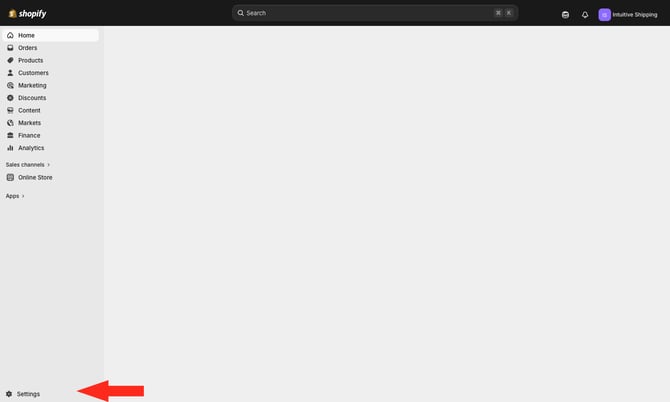
**1.** Go to your Shopify Admin page, then click **Settings** at the bottom of the sidebar menu.
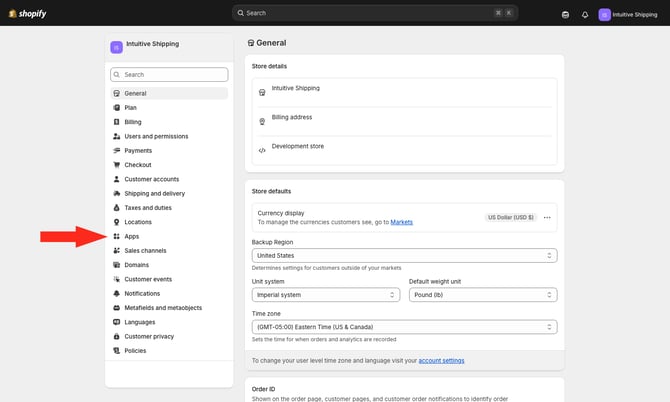
**2.** Click **Apps** on the Settings menu.
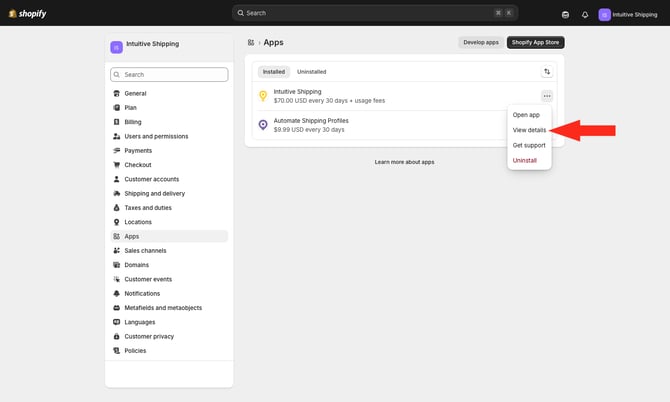
**3.** Click the **ellipsis** (three dots) beside 'Intuitive Shipping', then select **View details** from the drop-down list.
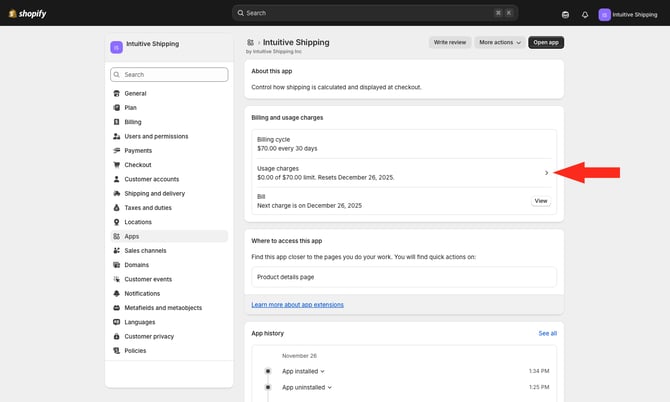
**4.** Click the **side-facing arrow** next to 'Usage charges'.
**5.** Enter a **new app spending limit amount**, such as ‘300.00’, **acknowledge the change**, then click the **Set limit to \[new amount\]** button.
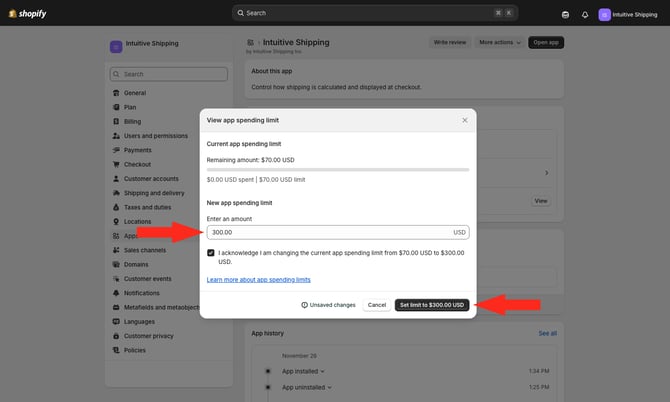
The new limit must always be higher than your current limit and cannot be reduced manually once confirmed.
### Upgrade Your Billing Plan
Increasing your app spending limit is a good way to ensure Intuitive Shipping continues to operate during periodic banner sales months. However, if you are consistently being invoiced additional order charges each month, and those additional costs exceed the price difference to the next highest billing plan, we recommend upgrading your plan.
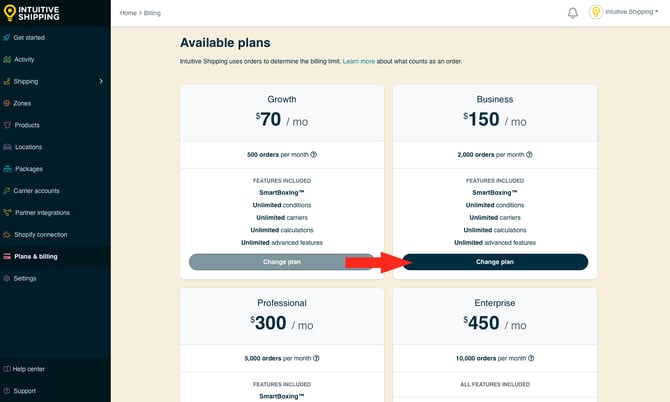
For example, let’s say you’re on the Growth plan at $70.00 per month. The next plan up is Business at $150.00 per month, which is a difference of $80.00. At $0.30 per additional order, that difference is equivalent to about 266 extra orders. If you are consistently exceeding 266 additional orders each month, upgrading to the Business plan is usually the better option. If your business is seasonal, you can always downgrade back to Growth during slower periods.
To upgrade your billing plan:
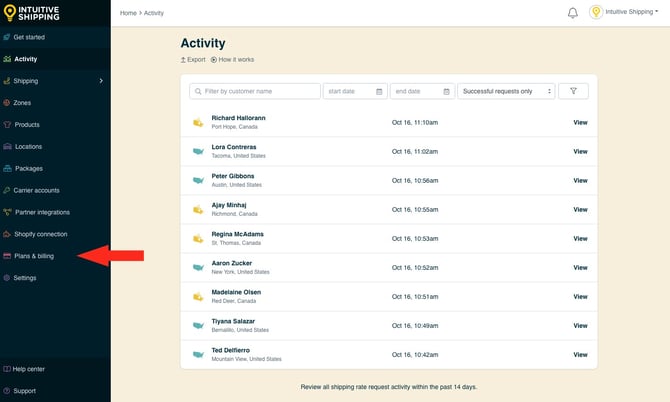
**1.** Click **Plans & billing** on the sidebar menu.
**2.** Select a **higher plan**. You will be asked by your eCommerce platform to confirm the plan change.
If you’ve exceeded your current plan’s order limit and are already accruing additional order charges, upgrading your plan will stop further charges from building up. Any charges already incurred will still be invoiced at the end of your billing cycle.
After selecting a new plan, you may be redirected to your eCommerce platform to approve the updated subscription. Follow the on-screen steps to confirm and accept the new monthly billing charges from Intuitive Shipping.
**Please note:** when you upgrade to a higher plan, your app spending limit is automatically updated to match the cost of your new plan. For example, if you originally activated the Growth plan, your spending limit would have been set to $70.00. If you did not [manually increase it](https://knowledge.intuitiveshipping.com/change-your-shopify-app-spending-limit#increase-app-spending-limit) and then upgrade to the Business plan at $150.00 per month, your spending limit will automatically increase to $150.00.
With the Business plan, you can process up to 2000 included orders. The updated spending limit allows for an additional 500 orders at $0.30 per order, giving you a total maximum of 2500 orders for the month.
### Learn more:
- [Common setups](https://knowledge.intuitiveshipping.com/common-setups?hsLang=en)
- [Additional setups](https://knowledge.intuitiveshipping.com/additional-setups?hsLang=en)
- [How-to guides](https://knowledge.intuitiveshipping.com/how-to?hsLang=en)
- [Connect a carrier](https://knowledge.intuitiveshipping.com/connect-a-carrier?hsLang=en)
- [General info](https://knowledge.intuitiveshipping.com/general-info?hsLang=en)
- [FAQ](https://knowledge.intuitiveshipping.com/faq-page?hsLang=en)
- [Get Started](https://knowledge.intuitiveshipping.com/get-started?hsLang=en)
- [Common Setups](https://knowledge.intuitiveshipping.com/common-setups?hsLang=en)
- [Additional Setups](https://knowledge.intuitiveshipping.com/additional-setups?hsLang=en)
- [How-To](https://knowledge.intuitiveshipping.com/how-to?hsLang=en)
- [Connect A Carrier](https://knowledge.intuitiveshipping.com/connect-a-carrier?hsLang=en)
- [Black Friday](https://knowledge.intuitiveshipping.com/black-friday?hsLang=en)
- [Billing & Account](https://knowledge.intuitiveshipping.com/billing-account?hsLang=en)
- [General Info](https://knowledge.intuitiveshipping.com/general-info?hsLang=en)
- [Get Help](https://knowledge.intuitiveshipping.com/get-help?hsLang=en)
- [Main Site](https://intuitiveshipping.com/)
- [FAQ](https://knowledge.intuitiveshipping.com/faq-page)
- [Privacy Policy](https://intuitiveshipping.com/legal/privacy)
- [Terms](https://intuitiveshipping.com/legal/terms)
- [EULA](https://intuitiveshipping.com/legal/eula)
[](http://intuitiveshipping.com)
The shipping solution for serious sellers.
© Copyright 2019-2025 Intuitive Shipping Inc.