---
title: Cancel Your Subcription
description: Learn how to cancel your Intuitive Shipping subscription without uninstalling and losing your configuration settings.
---
[Skip to content](https://knowledge.intuitiveshipping.com/cancel-your-subcription#main-content)
[](https://knowledge.intuitiveshipping.com?hsLang=en)
- [FAQ](https://knowledge.intuitiveshipping.com/faq-page)
- [Main Site](https://intuitiveshipping.com/)
Open main navigation
Close main navigation
- [FAQ](https://knowledge.intuitiveshipping.com/faq-page)
- [Main Site](https://intuitiveshipping.com/)
- [Contact us](https://knowledge.intuitiveshipping.com/contact)
[Contact us](https://knowledge.intuitiveshipping.com/contact?hsLang=en)
How can we help?
- There are no suggestions because the search field is empty.
1. [Intuitive Shipping Help Center](https://knowledge.intuitiveshipping.com/?hsLang=en)
2. [Billing & Account](https://knowledge.intuitiveshipping.com/billing-account?hsLang=en)
# Cancel Your Subcription
## Cancel your subscription directly from the app without uninstalling.
**Contents:**
- [How It Works](https://knowledge.intuitiveshipping.com/cancel-your-subcription#how-it-works)
- [Cancel Your Subscription](https://knowledge.intuitiveshipping.com/cancel-your-subcription#cancel-subscription)
- [Uninstall Intuitive Shipping](https://knowledge.intuitiveshipping.com/cancel-your-subcription#uninstall) (optional)
If you don’t need Intuitive Shipping right now, you can easily cancel your subscription without uninstalling the app. All of your configuration settings will be preserved **as long as you don't** [uninstall Intuitive Shipping](https://knowledge.intuitiveshipping.com/cancel-your-subcription#uninstall).
We're sorry to see you go! We hope you'll return if your business needs change again. Thanks for giving us a try!
### How It Works
If you don’t need Intuitive Shipping right now but want to keep your settings and Scenario configurations, you can cancel your subscription without uninstalling the app.
When you click **Cancel subscription**, billing will stop and rates will no longer appear for customers at checkout. Your account will return to [Sandbox mode](https://knowledge.intuitiveshipping.com/select-a-billing-plan#sandbox-mode). All of your configurations and settings will remain unchanged, and you can continue using the app for testing for an unlimited time.
If your needs change and you decide to use Intuitive Shipping again, simply select a billing plan to start showing rates at checkout.

Older plans may no longer be available after your subscription is cancelled.
**Please note:** We can’t guarantee that your previous plan’s pricing or features will still be available when you return. If you were on a grandfathered plan, you can keep it as long as your account remains active. Once you cancel your subscription, that plan is no longer available, and you’ll need to choose from the current plans if you reactivate.
If you don’t plan to return, you can [uninstall the app through your eCommerce platform’s app settings](https://knowledge.intuitiveshipping.com/cancel-your-subcription#uninstall). After uninstalling, your configuration settings will be removed from our system after a short period of time.
### Cancel Your Subscription
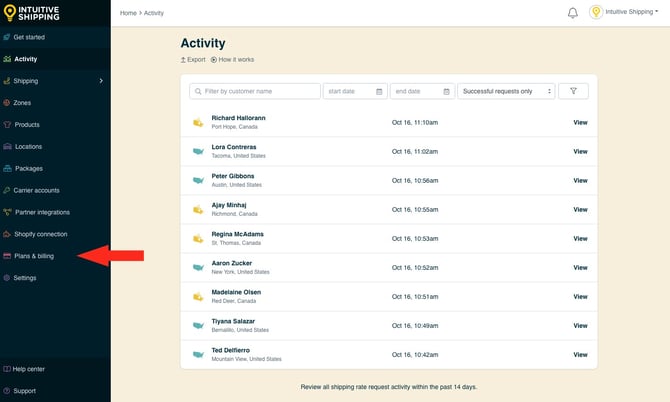
**1.** Click **Plans & billing** on the sidebar menu.
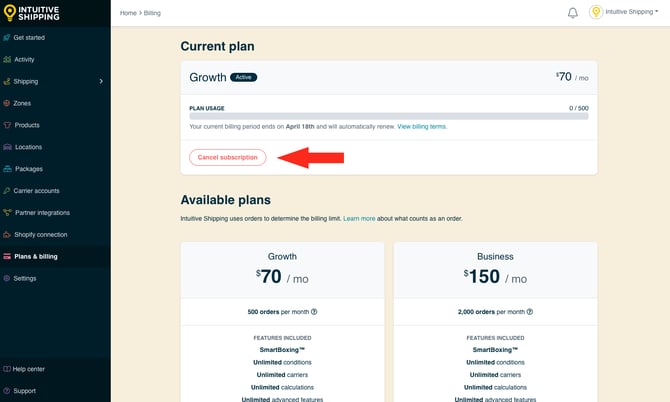
**2.** Click the **Cancel subscription** button.
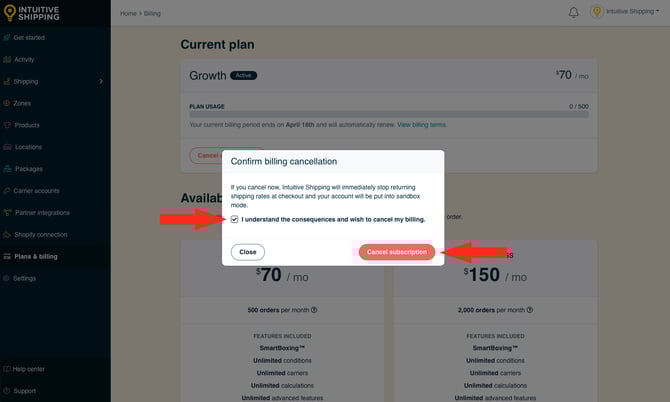
**3.** When prompted, **select the box** confirming that you **understand the** **consequences of cancelling**, then click **Cancel subcription** to stop billing.
Your final invoice may include charges for the current month and any additional order costs accrued before uninstalling.
All of your settings and configurations will remain intact until you [uninstall](https://knowledge.intuitiveshipping.com/cancel-your-subcription#uninstall) Intuitive Shipping. If you don't uninstall, You can continue to use Intuitive Shipping for an unlimited time in [Sandbox mode](https://knowledge.intuitiveshipping.com/select-a-billing-plan#sandbox-mode).
**Please note:** Free trials are only available for first-time activations. If you reactivate Intuitive Shipping, billing will resume immediately.

Learn how to [reactive Intuitive Shipping](https://knowledge.intuitiveshipping.com/select-a-billing-plan?hsLang=en).
### Uninstall Intuitive Shipping (optional)
If you don’t plan on using Intuitive Shipping again after cancelling your subscription, you can uninstall the app. This will remove it from your eCommerce platform’s app settings.
We do retain your settings for a limited time, but they will eventually be permanently deleted from our system.
Once your data has been removed, it cannot be recovered. If you return to Intuitive Shipping after that point, you will need to rebuild your setup from scratch.
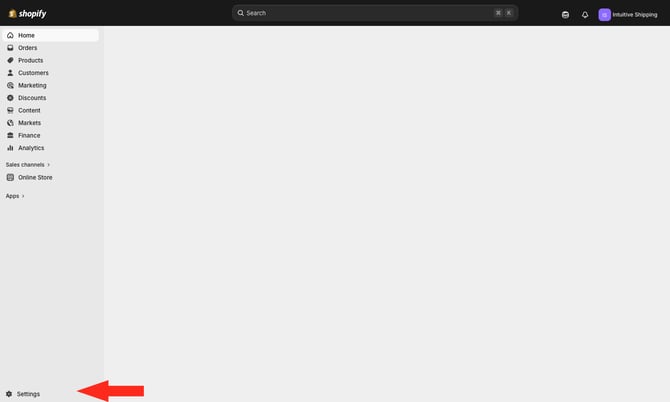
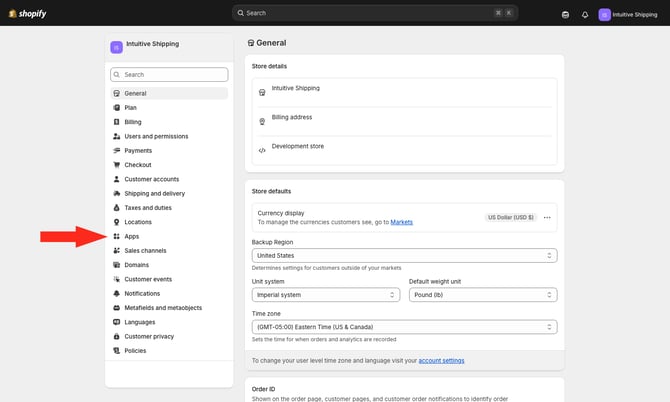
**1.** Go to your Shopify Admin page, then click **Settings** at the bottom of the sidebar menu.
**2.** Click **Apps** on the Settings menu**.**
****
**3.** Click the **ellipsis** (three dots) beside 'Intuitive Shipping', then select **Uninstall** from the drop-down list.
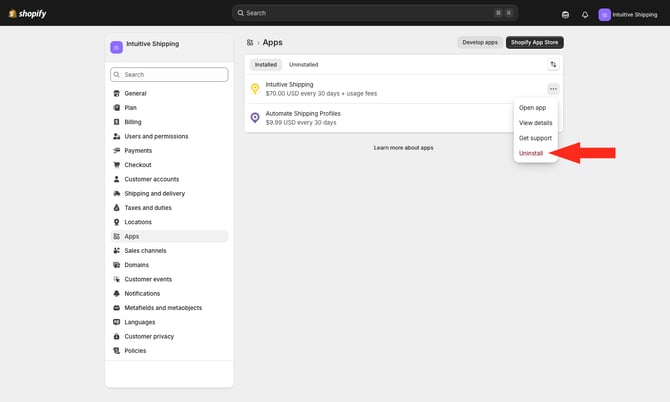
You’ll be prompted to confirm that you will no longer be able to use the app and that, after uninstalling, any data managed by the app will be deleted. You can also choose to leave a reason for uninstalling.
If Intuitive Shipping hasn't met your expectations, we’d really appreciate your feedback. If there’s anything we can do to make things right, we’d welcome the opportunity.
### Learn more:
- [Common setups](https://knowledge.intuitiveshipping.com/common-setups?hsLang=en)
- [Additional setups](https://knowledge.intuitiveshipping.com/additional-setups?hsLang=en)
- [How-to guides](https://knowledge.intuitiveshipping.com/how-to?hsLang=en)
- [Connect a carrier](https://knowledge.intuitiveshipping.com/connect-a-carrier?hsLang=en)
- [General info](https://knowledge.intuitiveshipping.com/general-info?hsLang=en)
- [FAQ](https://knowledge.intuitiveshipping.com/faq-page?hsLang=en)
- [Get Started](https://knowledge.intuitiveshipping.com/get-started?hsLang=en)
- [Common Setups](https://knowledge.intuitiveshipping.com/common-setups?hsLang=en)
- [Additional Setups](https://knowledge.intuitiveshipping.com/additional-setups?hsLang=en)
- [How-To](https://knowledge.intuitiveshipping.com/how-to?hsLang=en)
- [Connect A Carrier](https://knowledge.intuitiveshipping.com/connect-a-carrier?hsLang=en)
- [Black Friday](https://knowledge.intuitiveshipping.com/black-friday?hsLang=en)
- [Billing & Account](https://knowledge.intuitiveshipping.com/billing-account?hsLang=en)
- [General Info](https://knowledge.intuitiveshipping.com/general-info?hsLang=en)
- [Get Help](https://knowledge.intuitiveshipping.com/get-help?hsLang=en)
- [Main Site](https://intuitiveshipping.com/)
- [FAQ](https://knowledge.intuitiveshipping.com/faq-page)
- [Privacy Policy](https://intuitiveshipping.com/legal/privacy)
- [Terms](https://intuitiveshipping.com/legal/terms)
- [EULA](https://intuitiveshipping.com/legal/eula)
[](http://intuitiveshipping.com)
The shipping solution for serious sellers.
© Copyright 2019-2025 Intuitive Shipping Inc.